Publishing Date: 24 Oct, 2024

Updated on August 23, 2025 05:14:08 PM
Under Section 194-I of the Income Tax Act of 1961, the term ‘rent’ means any payment, by whatever name called, under any lease, sublease, tenancy, or any other agreement or arrangement for the use of (either separately or together) any land, building, machinery, equipment, furniture, or fitting. Other than Section 194-I, there are also some other sections that are applicable on payment of rent, such as Section 194-IB for individuals and Hindu Undivided Family (HUF) and Section-195 for payment of rent to NRI, respectively.
If you want to pay TDS online without following the traditional chain for payment of TDS by visiting the government official, you need to know the complete details about how to pay (deposit) the TDS online for rent.
Section 194I of Income Tax Act covers details about TDS on Rent; which is a tax that is deducted on the basis of the nature of property. Under section 194I TDS rates are @2% for plant and machinery and @10% for land and buildings. Generally, the TDS is deducted upfront by the taxpayer on the rent amount. The term 'rent' is referred to by name within the criteria for any tenancy, lease, sublease, agreement, or arrangement that facilitates the utilization of land, buildings, machinery, equipment, or fitting.
Here are some steps to follow while paying TDS online under the section 194I of Income tax act, which covers TDS on land, building and plant and TDS on machinery.
Note: This process of depositing TDS online is not applicable for rent paid by an individual or HUF on the immovable property including residential house which is covered under Section 194IB.
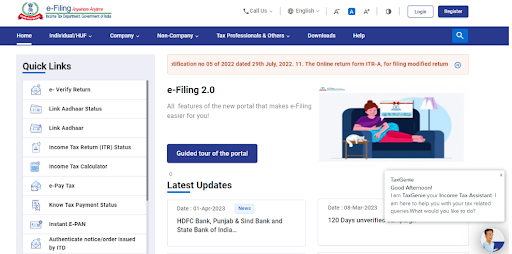
For deducting the TDS at a specified rate from the rent amount upfront, you've got to obtain the Tax Deduction and Collection Account Number (TAN) from the Income Tax Department. This TAN number helps to ensure the rate of TDS the deductor has to deduct, which is regulated as per the tax regulations. This number also tracks TDS payments.
Once you have obtained the TAN number, your next step is to deduct the TDS on the rent amount that exceeds the threshold of (₹2,40,000 per annum) mentioned u/s 194I. The TDS would be deducted based on the nature of the property i.e. at the rate of 2% for plant and machinery and 10% in case of land and buildings, respectively.
After deducting TDS at specified rates given u/s 194I for both plant & machinery and for land and buildings, your next step is to deposit the deducted amount with the government within specified due dates. That is, “on or before 7 days from the end of the month in which the deduction is made”. “If deduction is made in the month of March on or before April 30”.
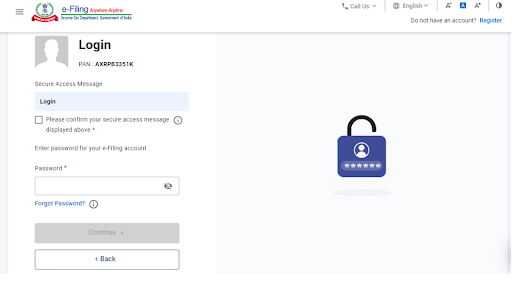
For depositing the deducted amount, you don’t have to physically deposit the tax with the government. You can apply to deposit TDS on rent via online mode through the Income Tax Department Website using e-payment facilities.

After depositing the TDS on rent online, the next step is to file the TDS return using Form 26Q. This form is used to supply the details of TDS on all payments except salaries. You can file the return for TDS on rent through an online website called TRACES (TDS Reconciliation Analysis and Correction Enabling System). The foremost goal of the TRACES tool is to allow both payers and deductors to check and reconcile their TDS payments online.
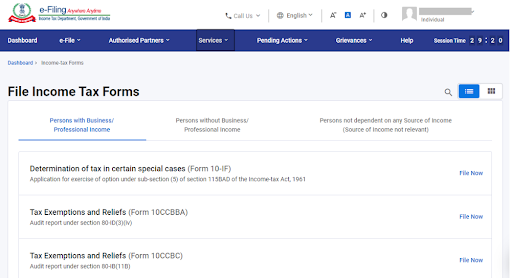

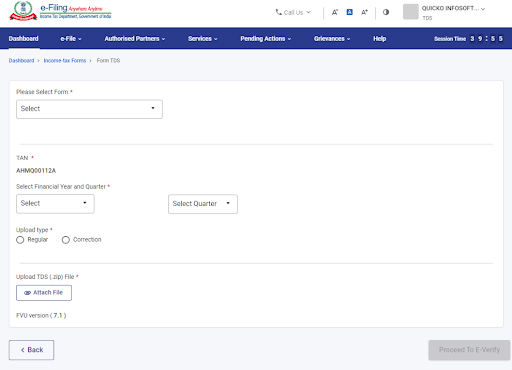
On filing the TDS return through TRACES for TDS on Rent, TDS certificate will be issued on behalf of the deductee by using Form 16A, which contains details of deposition of TDS with the government and deduction of TDS on the given amount.
Here are the penalties for TDS on rent:
As per Section 194-I , any person other than an individual and HUF or (Individuals and HUF liable for tax audit under Section 44AB) is required to deduct TDS @ 2% in case of plant and machinery and 10% in case of land and buildings from the rent payment made to a resident on amount exceeding threshold i.e.,₹2,40,000 per annum. After deduction the said person is required to furnish return using form 26Q quarterly and deposit the said amount with government on or before 7th of the following month (except for the month of march ,on or before April 30 ). At last issue Form 16A which serves as a proof for deduction and deposition of TDS with the government. To check whether the procedures of filing the TDS are accurate without any error, you have to make sure that you are connected with well-qualified CA experts and professionals to get your TDS return file without delay.
1) Which form is required for filing TDS rent online?
Form 26Q is required for filing TDS on rent online. By using this form, applicant files TDS return u/s 194I, TDS on Rent.
2) What is the need of Form 16A ?
Form 16A is a certificate issued under section 203 of the Income Tax Act of 1961, to the person who has deducted tax at source (TDS) on certain payments other than salary such as interest, commission, rent, etc. Form 16A contains details of the TDS deducted and deposited with the government on behalf of the deductee.
3) Is correction possible of the TDS amount after submission ?
Yes, one can correct the TDS amount by submitting the request via TRACES portal. This can also be done on the Income Tax portal.

CA Nayani Agarwal


Difference Among Society, Trust and Section 8 Company
28 Jun, 2025
Difference between Notary and Apostille
28 Jun, 2025
Top 14 Tools & Website to Grow a Brand
19 May, 2025
How to find Virtual Office for Company Registration in India?
03 May, 2025
Is Virtual Office Legal in India?
03 May, 2025
Share article via:







Bizfoc is a leading accounting firm specialising in a wide spectrum of services covering company registration in India, accounting, stock audits, GST, ESOP, FEMA, import export and income tax returns filing. Our outstanding teams excel across various industries, offering customised solutions that compare to none in quality.


75–76, Adchini Hauz Khas (South Delhi) New Delhi – 110017, India
Unit No. 235, II Floor, JMD Megapolis Sohna Rd, Sector 48 Gurugram, Haryana, 122018
Unit No. 2303A, 23rd Floor, The Iconic Corenthum, Sector 62, Noida, Uttar Pradesh, 201309
Unit No. 402, Myhome Vihanga, Gachibowli, Hyderabad, Telangana, 500032
C-701, Elegant Residency Phase II, Nigdi, Near Inspiria Mall, Pune, 411044
6/207, Vipul Khand, Gomti Nagar, Lucknow, 226010
© 2026 Bizfoc Business Solutions Private Limited. All Rights Reserved. Made with
 Why Trust Us
 Trust Us
 Our Founder
 Reviews